
Appearance
Merchandising Alerts - Overview
Merchandising alerts check cooler images against the planogram and your thresholds: missing products, low stock, foreign products, share of shelf, planogram compliance, product assortment and price tags. This page lists each alert type, when it opens and closes, and the setting that controls it.
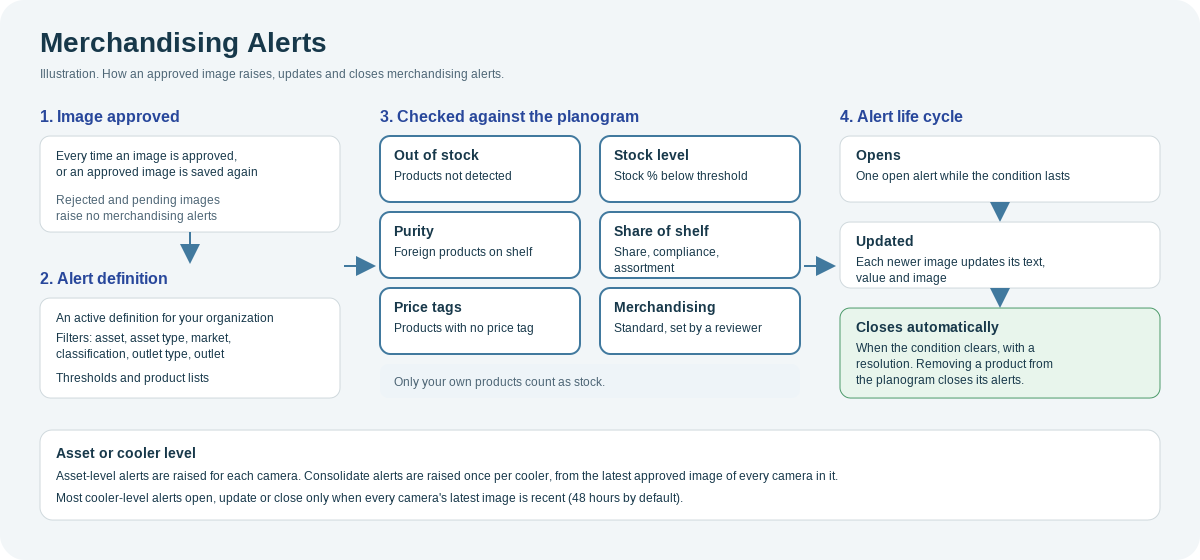
Open the full-size Merchandising Alerts diagram.
How merchandising alerts work
- When they run: every time an image is approved, including when an approved image is corrected and saved again. Rejected and pending images do not raise merchandising alerts.
- Set up: each alert needs an active alert definition for your organization on the Alert Definition screen. A definition can be limited by asset, asset type, market, classification, outlet type or outlet; a filter left empty applies to all.
- One open alert at a time: an alert stays open while the condition continues. Each newer image updates its text, value and image. When the condition clears, the alert closes automatically with a resolution, such as Product is back in stock. If the condition returns later, a new alert opens.
- Asset or cooler level: some alerts are raised for each camera (asset). Consolidate alerts are raised once per cooler: they combine the latest approved image of every camera in the cooler (the parent asset and its child assets).
- Recent images only: most cooler-level alerts open, update or close only when every camera's latest image is recent, within Latest Image Threshold (Min) (48 hours when empty).
- What counts as stock: only your own products count. Products marked as foreign, empty spaces and unknown items never count as stock. A product that is not in the image's planogram is not expected, so it is never reported missing.
- Planogram changes: when a product is removed from the planogram, its open product alerts close.
- Alert text: the definition's alert body can use
{|Product|},{|ProductSKU|},{|ProductUPC|},{|ProductId|}and{|EventTime|}; they are replaced with the affected products and the image time.
Out-of-stock alerts
| Alert type | Level | Opens when | Closes when | Use it to |
|---|---|---|---|---|
| Target Portfolio Compliance Count | Asset, one alert per product | A product in the image's planogram is not detected in the image. With a Products list and Product Count N, one alert opens when N or more of the listed products are missing. | The product is detected again, or fewer than N listed products are missing. | Find SKU out-of-stocks on each camera and notify the replenishment team. |
| Product Out Of Stock | Cooler, one alert per product | A product from the Products list is not detected in the latest image of any camera in the cooler. With Product Count N, one alert opens when N or more listed products are missing. | The product is detected on any camera. With Product Count, the alert closes and a new one opens when the set of missing products changes. | Find out-of-stocks for a whole multi-camera cooler. |
| Opportunity Out Of Stock By Outlet | Outlet, one alert per product | A product from the Products list, and in a planogram at the outlet, is not detected in the latest image of any cooler at the outlet. | The product is detected at the outlet, or it is removed from the list or the planogram. | Find products missing from a whole store and notify stakeholders. |
| Product Low Stock | Asset, one alert per product | A product is detected, but on Lane Threshold facings or fewer. With Product Count, only the Products list is checked; otherwise every product in the image. | The product is detected on more facings than Lane Threshold. | Refill products before they run out. |
- Product Out Of Stock: a camera whose latest image is older than Latest Image Threshold (Min) is treated as in stock, so an old image cannot raise the alert.
- Opportunity Out Of Stock By Outlet: runs only for images from coolers with a camera, and for after images from photo ingestion and surveys. It waits while an outlet has a before image without its after image. When Latest Image Threshold (Min) is set, an outlet with an older image is skipped.
Stock level alerts
Stock % is the number of detected facings × 100 ÷ the facings in the planogram.
| Alert type | Level | Opens when | Closes when |
|---|---|---|---|
| Product On Shelf Availability | Asset, one alert per product | A product's stock % is below Stock Threshold (%) with Alert For all Product? selected, or below its Stock % on the Product-wise Stock list. Product planograms only. | Stock % reaches the threshold. |
| Stock Alert Product Wise Consolidate | Cooler, one alert per product | A product's stock % across all cameras' latest images is below its Stock % on the Product-wise Stock list. | Stock % reaches the threshold. |
| Product Category Occupancy | Asset, one alert per category | A category's stock % is below its Stock % on the Product-Category-wise Stock list. Category planograms only. | Stock % reaches the threshold. |
| Product Stock Level | Cooler, one alert per product | A product's stock level, from the recognized facing depth, is below Stock Threshold (%). Applies to all products with Alert For all Product?, or to the Product-wise Stock list. | The stock level reaches the threshold. |
| Low Inventory Consolidate | Cooler | The cooler's own stock × 100 ÷ its planogram facings, across all cameras, is below Stock Threshold (%). | Stock reaches the threshold. |
- Product Stock Level: before images from StoreBuddy are skipped, and images older than Latest Image Threshold (Min) are ignored.
Purity alerts
| Alert type | Level | Opens when | Closes when | Use it to |
|---|---|---|---|---|
| Purity Alert Consolidate | Cooler | Purity is below Purity Threshold (%). Purity is own stock × 100 ÷ total stock (own plus foreign products) across all cameras' latest images. The alert lists the foreign products found. | Purity reaches the threshold. | Keep shelves pure: remove competitor products and refill your own. |
Share of shelf, compliance and assortment alerts
| Alert type | Level | Opens when | Closes when |
|---|---|---|---|
| Share of Shelf | Asset | Share of shelf is below Stock Threshold (%). Share of shelf is own stock × 100 ÷ (empty facings + total stock). The alert lists the planogram products missing from the image. | Share of shelf reaches the threshold. |
| Planogram Compliance Consolidate Alert | Cooler | Facings in their planned position × 100 ÷ own stock, across all cameras, is below Planogram Threshold (%). | Compliance reaches the threshold. |
| Target Portfolio Compliance Consolidate | Cooler | The share of planogram products that are present is below Target Portfolio Threshold. For StoreBuddy images, the cooler's stored target portfolio compliance is used. | Compliance reaches the threshold. |
| Category Assortment Depth Consolidate | Cooler | The number of different products found in a category is below its Unique Facings Quantity or above its Maximum Value on the Product Category list. 999 means no maximum. | Every category is back in range. |
- Category Assortment Depth Consolidate: counts across the latest images of all the cooler's cameras, taken within 48 hours of each other. If a category rule is invalid or listed twice, the whole definition is skipped.
Price tag alerts
Price tags are marked during image review as Tag, No tag or N/A. N/A is never treated as a missing tag.
| Alert type | Level | Opens when | Closes when |
|---|---|---|---|
| Missing Product & Price Tag | Asset, one alert per product | A planogram product is marked No tag. | An image shows no missing price tags. |
| Missing Price Tag | Asset, one alert per product | A product is marked No tag and is not detected (out of stock). Such a product raises this alert instead of Missing Product & Price Tag. | The product is detected again or its price tag is found. |
For StoreBuddy images, open price tag alerts from the cameras move to the cooler (parent asset).
Merchandising Standard alert
| Alert type | Level | Opens when | Closes when |
|---|---|---|---|
| Merchandising Standard | Asset | A reviewer marks an image as having a merchandising issue. Merchandising Standard must be enabled for your organization. | A reviewer clears the mark. |
Alert types that are not raised
These alert types are listed but no process raises them as alerts. Use the alternative instead.
Alert definitions of the Purity Sales Alert, Fullness & Purity and Product Category Occupancy Consolidated types are still run by the scheduled reports task, in the same way as Report From URL. They send only the scheduled report set in their Settings, not alerts.
| Alert type | Use instead |
|---|---|
| Planogram Compliance | Planogram Compliance Consolidate Alert |
| Product Category Occupancy Consolidated | Product Category Occupancy |
| Purity Sales Alert | Purity Alert Consolidate |
| Fullness & Purity | Low Inventory Consolidate and Purity Alert Consolidate |