Overview
The More screen serves as a centralized hub that provides access to additional tools and features extending the core functionality of the application. It enables users to efficiently manage smart devices, assets, real-time image recognition, field activities, surveys, and visit data—helping streamline day-to-day workflows.
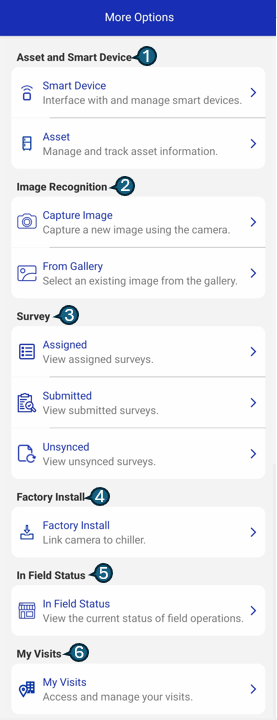
Available Sections
| # | Section | Description |
|---|---|---|
| 1 | Asset / Smart Device | Manage and interact with connected Assets and Smart Devices. |
| 2 | Image Recognition | Perform real-time image recognition and analysis. |
| 3 | Survey | Analyze survey data based on geographic location and field inputs. |
| 4 | Factory Install | Secure factory-level linking of coolers and cameras for deployment readiness. |
| 5 | In-Field Status | Monitor the current status of ongoing field operations. |
| 6 | My Visits | Access, review, and manage scheduled and completed visits. |