
Appearance
System Alert Service Levels and Escalation
This page explains how CoolR prioritizes, monitors and handles the system alerts that the CoolR platform raises, and the target times for acknowledgement, investigation, customer coordination and resolution.
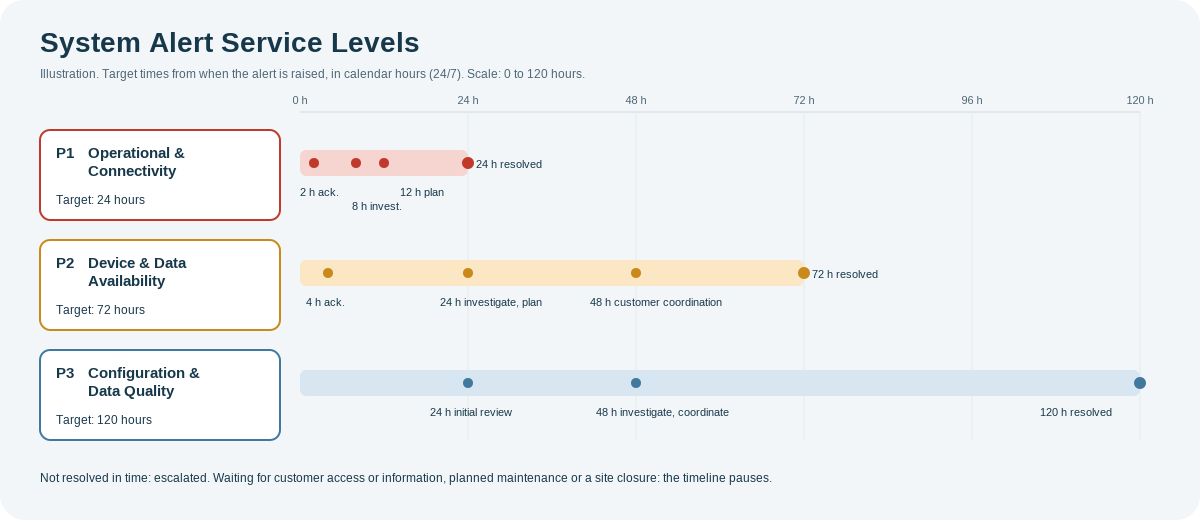
Open the full-size System Alerts SLA diagram.
Note
The times are target service levels under normal operating conditions, measured in calendar hours (24/7). Actual resolution can depend on the issue, device or site conditions, access, customer input and other external dependencies. Read them together with your customer agreement and any agreed service terms.
Alert priority
System alerts are grouped into three priorities, by their operational impact and the type of action usually needed. The priority of an alert can also depend on its circumstances and business impact.
| Priority | Category | Typical examples | Target resolution |
|---|---|---|---|
| P1 | Operational & Connectivity | A device stops communicating or cannot connect | Within 24 hours |
| P2 | Device & Data Availability | Missing image or door data, modem or battery problems, unreadable images | Within 72 hours |
| P3 | Configuration & Data Quality | Missing setup such as a planogram, unusual image activity, data quality issues | Within 120 hours |
For what triggers each alert, see System Alerts.
How CoolR handles an alert
- Identification: the platform raises and records the alert from its monitoring conditions.
- Initial review: the alert is reviewed to understand its nature, scope and impact.
- Investigation: the responsible team finds the cause and decides the action.
- Customer coordination: when customer information, access, approval or action is needed, CoolR contacts the customer with the details.
- Resolution and validation: after the corrective action, the alert is checked and closed.
- Escalation, if needed: alerts that need more attention or coordination are escalated through the service management channels.
Service handling targets
P1 — Operational & Connectivity
Issues with a more immediate impact on device communication or operations. Target resolution: within 24 hours.
| Time from alert | Activity |
|---|---|
| 0–2 hours | Acknowledgement and initial assessment |
| 0–8 hours | Investigation and initial root-cause assessment |
| Within 12 hours | Action plan and ownership confirmed |
| Within 24 hours | Target resolution or escalation |
When customer input or access is needed, resolution depends on when it is available.
P2 — Device & Data Availability
Device availability, data availability or device conditions that can affect normal data collection, such as missing image or door data, modem or device availability, and low battery. Target resolution: within 72 hours.
| Time from alert | Activity |
|---|---|
| 0–4 hours | Acknowledgement and initial assessment |
| Within 24 hours | Investigation and action planning |
| Within 48 hours | Customer coordination, where needed |
| Within 72 hours | Target resolution or escalation |
P3 — Configuration & Data Quality
Configuration, data quality or other exceptions that need review and correction, such as missing or incomplete configuration, unusual image activity and data quality exceptions. Target resolution: within 120 hours.
| Time from alert | Activity |
|---|---|
| Within 24 hours | Initial review |
| Within 48 hours | Investigation and customer coordination, where needed |
| Within 120 hours | Target resolution or escalation |
Customer collaboration
Some alerts need the customer's help before they can be resolved, for example:
- providing site or device access;
- confirming the outlet or device status;
- providing requested information;
- approving a required action;
- supporting a device replacement or site activity.
To keep to the target times, provide the information or access as soon as reasonably possible. When resolution depends on customer action, the timeline is adjusted.
Escalation
CoolR escalates an alert when it needs more attention, coordination or a decision, for example when:
- several teams must coordinate;
- the issue has a broader operational or business impact;
- resolution depends on an external activity or dependency;
- the issue cannot reasonably be resolved within the target time;
- more customer or service-level attention is needed.
Escalation makes sure the right people are involved and progress stays visible.
Timeline exceptions
The service timeline can be paused or adjusted when resolution depends on conditions outside the normal process, such as:
- planned maintenance;
- a temporary outlet or site closure;
- a device replacement;
- waiting for customer access or information;
- events outside reasonable operational control.
When the dependency is resolved, handling continues from where it was paused.
Alert tracking
Each system alert is tracked on its own, with clear ownership, investigation and resolution. When similar alerts occur at several outlets, each outlet is evaluated on its own device and operating conditions, so site-specific issues are handled correctly.
Service level summary
| Priority | Focus | Target resolution |
|---|---|---|
| P1 | Operational & Connectivity | 24 hours |
| P2 | Device & Data Availability | 72 hours |
| P3 | Configuration & Data Quality | 120 hours |