Overview
The Devices screen provides a centralized hub for all device-related operations, including diagnostics, configuration, installation, and activation. The screen is organized into clear sections to streamline workflows for field and warehouse teams.
Layout
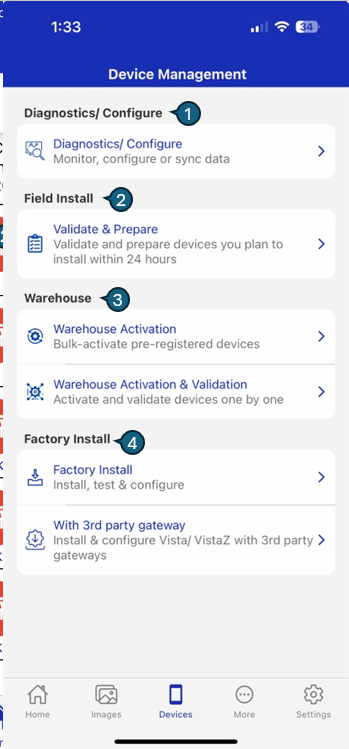
The Device Management layout is divided into key sections, each supporting a specific workflow:
| # | Section | Description |
|---|---|---|
| 1 | Diagnostics/Configure | Monitor, configure, and sync CoolR smart devices. Supports BLE scanning, remote commands, and data/image sync. |
| 2 | Field Install | Validate and prepare devices for installation within 24 hours to ensure readiness. |
| 3 | Warehouse | Bulk-activate or validate devices, either all at once or one by one, for warehouse handling. |
| 4 | Factory Install | Install, test, and configure devices at the factory, including support for 3rd party gateways. |